JasonWang's Blog

深入Linux容器LXC之一-LXC的实现原理

字数统计: 3.7k阅读时长: 16 min
2025/06/06

容器(Containers)是一种创建轻量级虚拟的应用执行环境的技术;基于容器技术,我们可以轻松的在同一个操作系统中构建出多个隔离、虚拟的运行环境,不同于基于虚拟化技术(hypervisor)的硬件级别的隔离方案,容器通过Linux内核中的命名空间(Namespace)以及控制分组(Cgroups)来实现进程级资源如CPU、内存、IO、网络等隔离与管理。目前常见的容器方案有Linux Containers(LXC)DockerLXC可以用于进程执行也可以用于启动一个系统镜像(包含rootfs的完整系统执行环境),而Docker一般用于云计算中的应用程序的打包运行。

深入Linux容器文章系列准备分为上下两篇来写,第一篇主要围绕LXC容器的基本实现原理以及如何在ubuntu系统中创建自己的容器;下篇主要从源码的角度分析下LXC是如何实现的。这篇文章,我们着重了解下LXC的实现原理,主要从如下两个方面进行介绍:

  • 首先从namespacecgroups两个基本的概念介绍LXC的基本原理
  • 基于Ubuntu系统搭建、启动一个完整的LXC容器

本文基于内核5.10版本源代码分析

LXC的实现原理

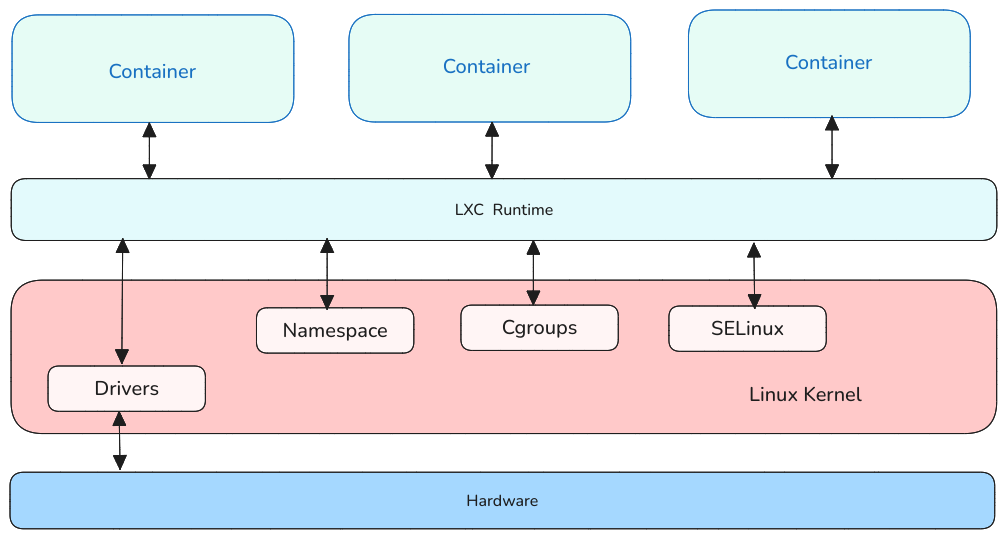
LXC是一种操作系统级别的系统隔离方案,容器之间通过namespacecgroups来实现资源的隔离与控制;SELinux则用于控制宿主系统与容器以及容器与容器之间的安全隔离与权限控制。在容器与内核中间通过容器运行时环境来统一管理不同的容器的创建、启动与销毁,不同容器之间实际是共用一个内核与所有的硬件设备,这个不同于XENQNX这样的虚拟化方案:

LXC-architecture

下面我们就来看看构成LXC的两个基础能力namespacecgroups

namespace(命名空间)

内核中的namespace是用于隔离不同进程资源的手段;每个进程在初始化的时候,都会有自己的命名空间用于管理系统的资源,比如CPU、网络、IPC(跨进程通讯)、PID等,这样不同命名空间的进程资源是相互隔离的,无法被对方看到、访问。这个跟编程语言中的命名空间有点类似,本质上都是对不同类型的资源进行隔离,避免相互影响。

当前内核中,有8中不同类型的命名空间:

Namespace 标志位 隔离的资源
Cgroup CLONE_NEWCGROUP cgroup根目录
IPC CLONE_NEWIPC System V IPC, POSIX消息队列
Network CLONE_NEWNET 网络设备,协议栈,协议端口
Mount CLONE_NEWNS 文件系统挂载点
PID CLONE_NEWPID 进程PID
Time CLONE_NEWTIME 系统启动、运行的时钟
User CLONE_NEWUSER UID、GID
UTS CLONE_NEWUTS 主机名、NIS域服务名

在内核代码中,所有的命名空间都用一个结构体struct nsproxy封装起来,进程的数据结构struct task_struct会有一个对应的指针来表示该进程所属的命名空间:

1
2
3
4
5
6
7
8
9
10
11
12
13
14
15
16
17
18
19
20
21
22
23
24
25
26
27
28
29
30
31
32
33
34
35
36
37
38
39
40
41
42
43
44
45
46
47
48
49
50
51
52
53
54
55
56
57
58
59
60
61
62
63
64
65
66
67
68
69
70
71
72
73
74
75
76
77
78
79
80
81
82
83
84
85
86
87
88
89
90
91
92
93
94
95
96
97
98
struct task_struct {
#ifdef CONFIG_THREAD_INFO_IN_TASK
/*
* For reasons of header soup (see current_thread_info()), this
* must be the first element of task_struct.
*/
struct thread_info thread_info;
#endif
/* -1 unrunnable, 0 runnable, >0 stopped: */
volatile long state;

/*
* This begins the randomizable portion of task_struct. Only
* scheduling-critical items should be added above here.
*/
randomized_struct_fields_start

void *stack;
refcount_t usage;
/* Per task flags (PF_*), defined further below: */
unsigned int flags;
unsigned int ptrace;
...
int on_rq;

int prio;
int static_prio;
int normal_prio;
unsigned int rt_priority;

const struct sched_class *sched_class;
struct sched_entity se;
struct sched_rt_entity rt;
#ifdef CONFIG_CGROUP_SCHED
struct task_group *sched_task_group;
#endif
struct sched_dl_entity dl;

...

unsigned int policy;
int nr_cpus_allowed;
const cpumask_t *cpus_ptr;
cpumask_t cpus_mask;
...
struct sched_info sched_info;

struct list_head tasks;
...
struct mm_struct *mm;
struct mm_struct *active_mm;
...
int exit_state;
int exit_code;
int exit_signal;
/* The signal sent when the parent dies: */
int pdeath_signal;
/* JOBCTL_*, siglock protected: */
unsigned long jobctl;

/* Used for emulating ABI behavior of previous Linux versions: */
unsigned int personality;

/* Scheduler bits, serialized by scheduler locks: */
unsigned sched_reset_on_fork:1;
unsigned sched_contributes_to_load:1;
unsigned sched_migrated:1;
#ifdef CONFIG_PSI
unsigned sched_psi_wake_requeue:1;
#endif


/* Bit to tell LSMs we're in execve(): */
unsigned in_execve:1;
unsigned in_iowait:1;
...
#ifdef CONFIG_CGROUPS
/* disallow userland-initiated cgroup migration */
unsigned no_cgroup_migration:1;
/* task is frozen/stopped (used by the cgroup freezer) */
unsigned frozen:1;
#endif
#ifdef CONFIG_BLK_CGROUP
unsigned use_memdelay:1;
#endif
#ifdef CONFIG_PSI
/* Stalled due to lack of memory */
unsigned in_memstall:1;
#endif
...
pid_t pid;
pid_t tgid;
...
/* Namespaces: */ --> 命名空间
struct nsproxy *nsproxy;
...
};

可以看到,结构体struct nsproxy实际是上述几种类型的命名空间的集合,每个命名空间都有指向各个类型命名空间的的指针,另外还包括了count用于计数,表示当前命名空间被多少个进程使用。

1
2
3
4
5
6
7
8
9
10
11
12
13

struct nsproxy {
atomic_t count;
struct uts_namespace *uts_ns;
struct ipc_namespace *ipc_ns;
struct mnt_namespace *mnt_ns;
struct pid_namespace *pid_ns_for_children;
struct net *net_ns;
struct time_namespace *time_ns;
struct time_namespace *time_ns_for_children;
struct cgroup_namespace *cgroup_ns;
};

通过系统proc目录,我们可以查看当前系统中进程的命名空间信息;在3.8之前的版本,这些都是硬链接(hard link),3.8版本开始统一使用符号链接(symbolic link),由命名空间的名字加上对应的文件inode号组成的字符串。

1
2
3
4
5
6
7
8
9
10
11
12
13
14
15
16

~# ls -al /proc/1/ns/
total 0
dr-x--x--x 2 root root 0 6月 5 09:33 .
dr-xr-xr-x 9 root root 0 6月 5 09:33 ..
lrwxrwxrwx 1 root root 0 6月 5 09:33 cgroup -> 'cgroup:[4026531835]'
lrwxrwxrwx 1 root root 0 6月 5 15:41 ipc -> 'ipc:[4026531839]'
lrwxrwxrwx 1 root root 0 6月 5 09:33 mnt -> 'mnt:[4026531841]'
lrwxrwxrwx 1 root root 0 6月 5 15:41 net -> 'net:[4026531840]'
lrwxrwxrwx 1 root root 0 6月 5 15:41 pid -> 'pid:[4026531836]'
lrwxrwxrwx 1 root root 0 6月 5 15:41 pid_for_children -> 'pid:[4026531836]'
lrwxrwxrwx 1 root root 0 6月 5 15:41 time -> 'time:[4026531834]'
lrwxrwxrwx 1 root root 0 6月 5 15:41 time_for_children -> 'time:[4026531834]'
lrwxrwxrwx 1 root root 0 6月 5 15:41 user -> 'user:[4026531837]'
lrwxrwxrwx 1 root root 0 6月 5 15:41 uts -> 'uts:[4026531838]'

cgroups(控制分组)

cgroups(control groups)是一种任务资源分配与管控的机制,比如我们可以通过cpuset控制分组将某些CPU分配给特定的分组;通过memcfg控制分组可以限制某些进程的内存使用。与Linux中的任务层级结构类似,cgroups也是一种树状的层级结构,子进程自动的继承了父进程的cgroups,两者之间不同的是,cgroups会同时存在多个子系统,每个子系统都有自己独立的层级结构。目前Linux内核中常见的cgroups有如下几种(具体的类型可以参考linux/inclue/cgroup_subsys.h中的定义):

  • cpu子系统,为调度器提供限制进程的cpu使用率的参数
  • cpuacct子系统,可以统计cgroups中的进程的cpu使用数据
  • cpuset子系统,为cgroups中的进程分配单独的cpu节点或者内存节点
  • memory子系统,用于限制进程的内存使用量
  • blkio子系统,可以限制进程的块设备I/O请求
  • devices子系统,可以控制cgroups中的进程访问某些设备
  • net_cls子系统,用于标记cgroups中进程的网络数据包,然后通过tc(traffic control)对数据包进行控制
  • net_prio子系统,用于动态设置某个网卡流量的优先级
  • freezer子系统,用于挂起或者恢复cgroups中的进程
  • ns子系统,可以让不同cgroups进程使用不同的namespace
  • perf_event子系统,用于分析不同cgroups进程的性能
  • pids子系统,用于限制某个cgroup中的进程数量
  • hugetlb子系统,用于限制cgroup中进程的大页内存数量
  • rdma子系统,用于限制cgroup中的RDMA(Remote Direct Memory Access)的使用量

为了实现cgroups机制,内核在每个任务的结构体中都增加了一个struct css_set的指针,而css_set包含了引用计数的cgroup_subsys_state指针数组,每个cgroup_subsys_state对应着系统中注册的cgroup子系统类型。这样做一方面可以避免每个task_struct都保存一个css_set指针,减少存储的空间,另一方面在进程创建与退出的时候只需要对单个css_set进行操作,而无需对所有的子系统进行状态的更新:

1
2
3
4
5
6
7
8
9
10
11
12
13
14
15
16
17
18
19
20
21
22
23
24
25
26
27
28
29
30
31
32
33
34
35
36
37
38
39
40
41
42
43
44
45
46
47
48
49
50
51

struct css_set {
/*
* Set of subsystem states, one for each subsystem. This array is
* immutable after creation apart from the init_css_set during
* subsystem registration (at boot time).
*/
struct cgroup_subsys_state *subsys[CGROUP_SUBSYS_COUNT];

/* reference count */
refcount_t refcount;

/*
* For a domain cgroup, the following points to self. If threaded,
* to the matching cset of the nearest domain ancestor. The
* dom_cset provides access to the domain cgroup and its csses to
* which domain level resource consumptions should be charged.
*/
struct css_set *dom_cset;

/* the default cgroup associated with this css_set */
struct cgroup *dfl_cgrp;

/* internal task count, protected by css_set_lock */
int nr_tasks;

/*
* Lists running through all tasks using this cgroup group.
* mg_tasks lists tasks which belong to this cset but are in the
* process of being migrated out or in. Protected by
* css_set_rwsem, but, during migration, once tasks are moved to
* mg_tasks, it can be read safely while holding cgroup_mutex.
*/
struct list_head tasks;
struct list_head mg_tasks;
struct list_head dying_tasks;

/* all css_task_iters currently walking this cset */
struct list_head task_iters;

/*
* On the default hierarhcy, ->subsys[ssid] may point to a css
* attached to an ancestor instead of the cgroup this css_set is
* associated with. The following node is anchored at
* ->subsys[ssid]->cgroup->e_csets[ssid] and provides a way to
* iterate through all css's attached to a given cgroup.
*/
struct list_head e_cset_node[CGROUP_SUBSYS_COUNT];
...
};

内核把cgroup当做一个特殊的文件系统来对待,因此用户想要浏览与管理cgroup,首先需要通过挂载cgroup文件系统,然后像操作文件一样来管理整个cgroup的层级结构;目前内核支持cgroup1cgroup2两种类型,具体挂载的时候需要制定不同的参数:

1
2
3
4
5
6
7

#cgroup1
mount -t cgroup -o all cgroup /sys/fs/cgroup

#cgroup2
mount -t cgroup2 none /sys/fs/cgroup

系统初始化时,会调用cgroup_init对整个cgroup系统进行初始化,并注册两个特殊的文件系统cgroup/cgroup2到内核中,这样用户就可以对cgroup进行类似于常规文件设备进行操作了(在Linux内核中真是万物皆可为文件),具体可以参考内核的代码kernel/cgroup/cgroup.c

1
2
3
4
5
6
7
8
9
10
11
12
13
14
15
16
17
18
19
20
21
22
23
24
25
26
27
28
29
30
31
32
33
34
35
36
37
38
39
40
41
42
43
44


struct file_system_type cgroup_fs_type = {
.name = "cgroup",
.init_fs_context = cgroup_init_fs_context,
.parameters = cgroup1_fs_parameters,
.kill_sb = cgroup_kill_sb,
.fs_flags = FS_USERNS_MOUNT,
};

static struct file_system_type cgroup2_fs_type = {
.name = "cgroup2",
.init_fs_context = cgroup_init_fs_context,
.parameters = cgroup2_fs_parameters,
.kill_sb = cgroup_kill_sb,
.fs_flags = FS_USERNS_MOUNT,
};

/**
* cgroup_init - cgroup initialization
*
* Register cgroup filesystem and /proc file, and initialize
* any subsystems that didn't request early init.
*/
int __init cgroup_init(void)
{
...

/* init_css_set.subsys[] has been updated, re-hash */
hash_del(&init_css_set.hlist);
hash_add(css_set_table, &init_css_set.hlist,
css_set_hash(init_css_set.subsys));

WARN_ON(sysfs_create_mount_point(fs_kobj, "cgroup"));
WARN_ON(register_filesystem(&cgroup_fs_type));
WARN_ON(register_filesystem(&cgroup2_fs_type));
WARN_ON(!proc_create_single("cgroups", 0, NULL, proc_cgroupstats_show));
#ifdef CONFIG_CPUSETS
WARN_ON(register_filesystem(&cpuset_fs_type));
#endif

return 0;
}

我们可以通过/proc/cgroups查看内核支持的cgroup类型;也可以通过/proc/<pid>/cgroup来查看某个具体进程所在的cgroup种类。

1
2
3
4
5
6
7
8
9
10
11
12
13
14
15
16
17
18

~$ cat /proc/cgroups
#subsys_name hierarchy num_cgroups enabled
cpuset 0 259 1
cpu 0 259 1
cpuacct 0 259 1
blkio 0 259 1
memory 0 259 1
devices 0 259 1
freezer 0 259 1
net_cls 0 259 1
perf_event 0 259 1
net_prio 0 259 1
hugetlb 0 259 1
pids 0 259 1
rdma 0 259 1
misc 0 259 1

如何启动LXC容器

LXC容器相关的代码与工具都是开源的,其包含了好几个独立的组件:

  • liblxc库,主要包括容器核心的代码实现
  • 其他编程语言如python/lua/Go/ruby/Haskkell的胶水接口
  • 一整套创建、启动、监控、销毁容器的工具
  • 不同系统环境容器模版,可以在LXC官网找到参考的模版

接下来我们就以Ubuntu系统为例说明如何利用LXC工具来启动容器。首先,需要安装LXC容器相关的依赖库,执行如下命令:

1
2
3
4
5

sudo apt-get install lxc

sudo apt-get install lxc-templates

安装成功后,可以看到系统中多了很多LXC相关的工具,比如lxc-create/lxc-start/lxc-stop等;为了确保容器功能的正常,在创建容器之前,执行lxc-checkconfig来检查当前系统的配置是否满足要求,执行完后会输出相关的配置信息状态,可以看到当前系统版本是满足容器的运行环境的。

1
2
3
4
5
6
7
8
9
10
11
12
13
14
15
16
17
18
19
20
21
22
23
24
25
26
27
28
29
30
31
32
33
34
35
36
37
38
39
40
41
42
43
44
45
46

~$ lxc-checkconfig
LXC version 5.0.0~git2209-g5a7b9ce67
Kernel configuration not found at /proc/config.gz; searching...
Kernel configuration found at /boot/config-6.2.0-36-generic
--- Namespaces ---
Namespaces: enabled
Utsname namespace: enabled
Ipc namespace: enabled
Pid namespace: enabled
User namespace: enabled
Network namespace: enabled

--- Control groups ---
Cgroups: enabled
Cgroup namespace: enabled

Cgroup v1 mount points:


Cgroup v2 mount points:
/sys/fs/cgroup

Cgroup v1 systemd controller: missing
Cgroup v1 freezer controller: missing
Cgroup ns_cgroup: required
Cgroup device: enabled
Cgroup sched: enabled
Cgroup cpu account: enabled
Cgroup memory controller: enabled
Cgroup cpuset: enabled

--- Misc ---
Veth pair device: enabled, not loaded
Macvlan: enabled, not loaded
Vlan: enabled, not loaded
Bridges: enabled, loaded
Advanced netfilter: enabled, loaded
CONFIG_IP_NF_TARGET_MASQUERADE: enabled, not loaded
CONFIG_IP6_NF_TARGET_MASQUERADE: enabled, not loaded
CONFIG_NETFILTER_XT_TARGET_CHECKSUM: enabled, not loaded
CONFIG_NETFILTER_XT_MATCH_COMMENT: enabled, not loaded
FUSE (for use with lxcfs): enabled, not loaded

...

接着,通过lxc-create来创建一个容器,这里我们以busybox这个容器模版来执行创建:

1
2
3
4
5

# 管理容器需要root权限
sudo lxc-create -n busybox-lxc -t busybox


创建成功后,可以通过lxc-info来查看对应容器的状态,未启动的容器状态是STOPPED(停止态):

1
2
3
4
5

~$ sudo lxc-info -n busybox-lxc
Name: busybox-lxc
State: STOPPED

接着,我们需要通过lxc-start来启动该容器,让其处于运行状态,此时再检查容器状态就变为了RUNNING(运行态):

1
2
3
4
5
6
7
8
9
10
11
12
13

# 启动容器
~$ sudo lxc-start -n busybox-lxc

~$ sudo lxc-info -n busybox-lxc
Name: busybox-lxc
State: RUNNING
PID: 83579
Link: vethlkXyJr
TX bytes: 612 bytes
RX bytes: 5.92 KiB
Total bytes: 6.52 KiB

除了通过lxc-info查看容器状态外,还可以通过lxc-attach开启一个模拟的终端进入到容器内部查看系统运行的状态,登录成功后,会弹出一个新的终端符/#

1
2
3
4
5
6
7
8
9

sudo lxc-attach -n busybox-lxc


BusyBox v1.30.1 (Ubuntu 1:1.30.1-7ubuntu3) built-in shell (ash)
Enter 'help' for a list of built-in commands.

/ #

试着在终端输入top指令看看系统的进程状态,可以看到系统主要有几个进程:

  • 两个名为init进程,但pid并不一样,为啥有两个init进程了?这个留到下篇文章再深入分析。
  • 一个syslogd进程用于收集系统日志
  • udhcpc进程用于DHCP服务IP地址的分配与管理
  • getty用于与伪终端进行交互的守护进程
1
2
3
4
5
6
7
8
9
10
11
12
13

Mem: 40201368K used, 549680K free, 1329880K shrd, 738404K buff, 19484428K cached
CPU: 5% usr 0% sys 0% nic 94% idle 0% io 0% irq 0% sirq
Load average: 0.91 1.13 1.47 2/2955 21
PID PPID USER STAT VSZ %VSZ %CPU COMMAND
1 0 root S 2456 0% 0% init
4 1 root S 2456 0% 0% /bin/syslogd
14 1 root S 2456 0% 0% /bin/udhcpc
15 1 root S 2456 0% 0% /bin/getty -L tty1 115200 vt100
16 1 root S 2456 0% 0% init
17 0 root S 2456 0% 0% /bin/sh
21 17 root R 2456 0% 0% top

至此我们创建并启动了一个容器,如果要停止或者销毁某个容器,可以使用lxc-stop/lxc-destroy命令;除了这些指令外,LXC还提供了如下几个常用的命令,便于对容器进行管控:

  • lxc-execute在某个容器中执行一个特定的程序
  • lxc-freeze/lxc-unfreeze冻结、解冻某个容器的所有进程
  • lxc-cgroup管理容器中的cgroup配置
  • lxc-monitor监控容器的状态
  • lxc-device管理容器中的设备
  • lxc-snapshot保存容器快照

下一篇文章主要从源码的角度介绍下LXC容器具体是如何实现的。

参考文献

原文作者:Jason Wang

更新日期:2025-07-18, 17:20:12

版权声明:本文采用知识共享署名-非商业性使用 4.0 国际许可协议进行许可

CATALOG
  1. 1. LXC的实现原理
    1. 1.1. namespace(命名空间)
  2. 2. cgroups(控制分组)
  3. 3. 如何启动LXC容器
  4. 4. 参考文献